Monday, 18 September 2017

Outlook 2010/2013: How To Test Email Auto Configuration

Outlook 2010/2013: How To Test Email Auto Configuration

Outlook 2010 contains some features which are difficult to use or comprehend by novices and that’s why they are concealed by the Outlook Dev – team. In this post we will explore two new functions provided by Outlook 2010, which is not very apparent: Connection Status and Test E-mail AutoConfiguration are for viewing the connection status and testing email protocol and server configuration settings, respectively. The Connection Status is a feature that verifies the current status of connection with mail account servers, informing users about the issues they may be encountering while syncing the mail folders.
The Test E-mail AutoConfiguration, on the other hand, conduct a number of tests to check whether the mail accounts are properly configured or not. While you don’t have to test the configuration frequently, it may help you in situations where Outlook fails to sync the mail folders and goes offline without throwing any exceptions. The connection status and test email auto-configuration are basically developed to test connection with MS Exchange Server. However, you can use them with both POP3 and IMAP mail accounts.
To get started, launch Outlook 2010, hold Ctrl key and right-click the Outlook system tray icon. You will see two new options in the context menu, i.e; Connection Status and Test E-mail Auto Configuration.


Click Test E-mail AutoConfiguration to verify and check the email server configuration. Even though we have mentioned earlier that Microsoft Exchange integration is preferable, you can also check out the configuration details about the IMAP account you are using. Upon click, it will lead you to Test E-mail AutoConfiguration dialog. Click Test to start the configuration setting test. If the E-mail Adress and Password fields are empty, enter your mail account details and then click the Test button.


During testing you can also view the detailed log of each process by switching to Log tab. For viewing the complete XML file, click on XML tab.


After the testing is completed, you can see the results for the selected IMAP account. It will show you the complete details of the account like Protocol, Server, Port, Login Name, SSL (enabled) etc.

Tuesday, 4 July 2017

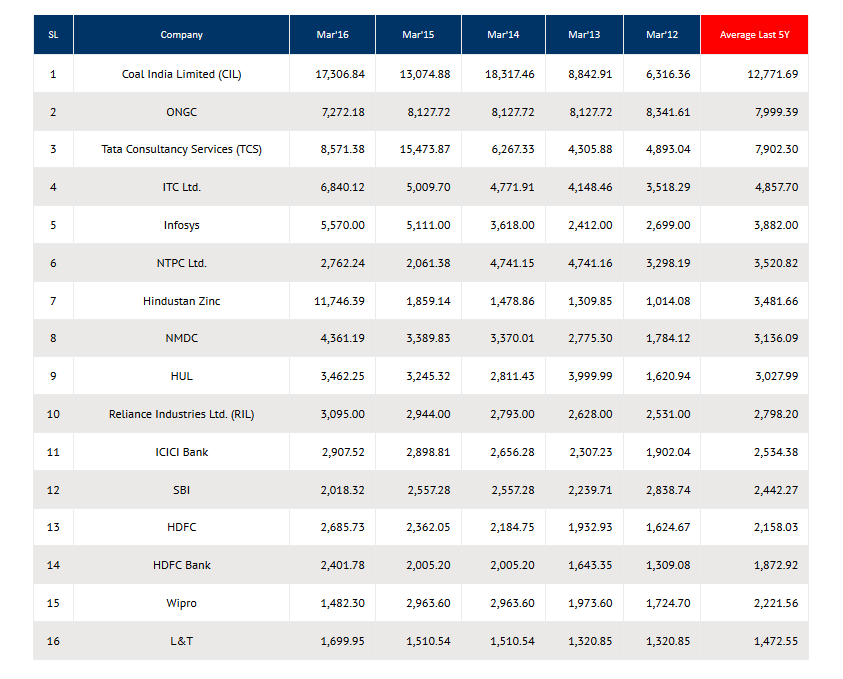
Best / High dividend paying stocks in India

Best / High dividend paying stocks in India

(Updated as on April’2017)

Lump Sum Dividend Paid (Rs.Crore)


Investors desire high return on investment. This is the reason why majority focus on capital appreciation. When I ask people to buy stocks for dividend income, they look at me with amazement.
People like capital appreciation more then dividend yield.
Dividend yields of stocks are low compared to potential price appreciation. But remember, price appreciations are never certain. Comparatively, certainty of dividend income is far higher then price growth.
Why champion investors love best dividend paying stocks more? What makes top dividend paying stocks so likeable by champion investors?
High growth rate is a priority for majority, but expert investors likes to have a balance portfolio. Portfolio focusing only on capital appreciation is not good. Inclusion of dividend paying stocks balances their portfolio. Expert investors also loves passive income.
Dividend income is one of the best forms of passive income. People who believes in passive income also loves stocks that pay dividends. Passive income in form of dividend is like an assured income.
Whereas capital appreciation (potential high growth) is not as assured.
For passive income lovers, it is essential to track and buy the highest dividend paying stocks. Not all stocks that pays dividends are best.
Expert investors does not like high dividend paying stocks just for assured income. Potential of dividend income to grow year after year makes it even more likable.

Wednesday, 19 April 2017

Google Adsense High Paying Keywords 2018

Google Adsense High Paying Keywords 2018

Google Adsense is one of the finest and leading monetizing networks to generate money from your blog. If your blog has good traffic, then you can earn a good income by using Google Adsense high paying keywords into your blog posts. Google Adsense was founded in 2003 and rapidly become a most popular and preferred monetizing network over any other. Its ad serving algorithm works on the mechanism of keywords density which is used/exists in your posts.

If you want to earn more money with AdSense, you must use Google Adsense high paying keywords. Otherwise using lowest paying keywords, your C.P.C (Cost per click) rate will be low, and you cannot earn a healthy income from advertisements clicks.

Here is a list of top high paying keywords for Google Adsense.

List of Google Adsense High Paying Keywords/Niche 2018

  1. Mesothelioma Law Firm ($179)
  2. Donate Car to Charity California ($130)
  3. Donate Car for Tax Credit ($126.6)
  4. Donate Cars in MA ($125)
  5. Donate Your Car Sacramento ($118.20)
  6. How to Donate A Car in California ($111.21)
  7. Sell Annuity Payment ($107.46)
  8. Donate Your Car for Kids ($106)
  9. Asbestos Lawyers ($105.84)
  10. Structures Annuity Settlement ($100.8)

Wednesday, 1 February 2017

TOP BEST WORKING KODI Video Add-ons 2017

TOP BEST WORKING KODI Video Add-ons  2017


Kodi add-ons are in a constant state of change with old ones that often were once the best sometimes replaced by newer add-ons.
 
This page is regularly updated to reflect changes and show the top current best working Kodi add-ons along with user Polls for feedback.
 
Each month we also test new popular addons to see if they make the list.
 
Since Exodus has been dominating as the most popular Kodi add-on we have split up the Poll.
 
One Poll will include Exodus and another exclude it. Hopefully this will help give a better picture for the top add-ons being used beside Exodus.
 
Be sure to vote for your favorite Kodi add-on below or let us know in the comments.
 
Here are the new Poll results from December.
 
Poll Results With Exodus


Poll Results Without Exodus 

Top Best Kodi Addon Jan 2017 Exodus


From the Poll results, here is the list of Top 10 Kodi add-ons for  2017, along with new add-ons being tested.

Tuesday, 31 January 2017

How to Back Up Your iPhone to a Computer

How to Back Up Your iPhone to a Computer


Your files are important, so a periodic backup of your data is highly recommended. This is because storage devices are always at the risk of being corrupted, damaged, lost, or stolen. Performing backups from one storage device to another ensures that you have copies of your files. When relating this to your phone, it is of the same importance to back up your iPhone to a computer so that you can recover files that may get lost due to uncontrollable circumstances. This backup method differs from the iCloud backup because it does not require any internet connection. Learn how to back up your iPhone to a computer here.

how to backup your iphone, iphone, iphone 5, iphone バックアップ, how to backup iphone, iphone warranty check, how to back up your iphone, how to backup iphone to icloud, how to reset iphone, how to backup iphone 6, itunes backup, icloud backup, how do i backup my iphone, iphone backup itunes, how to icloud backup, how to backup iphone 4s, how do you backup iphone, how to backup iphone using itunes, backup iphone to mac, back up iphone to computer, apple, icloud, backup, itunes, how to


You are done.

User Questions

Where can I find the stored backup file on my computer?

If you are on a Mac, you can find the backup files by entering this address in the search function: ~/Library/Application Support/MobileSync/Backup/.
You can also locate a specific backup file by going to iTunes Preferences > Devices
If you are using Windows, you can find the backup files by going to this address – \Users\(username)\AppData\Roaming\Apple Computer\MobileSync\Backup\.
You can check out our detailed tutorial on how to locate iPhone backups on your computer.

I have connected my iPhone to my computer, but it does not detect my device. What should I do?

Try removing and reinserting the lightning cable to the computer. Most often, this will fix the problems. A quick restart of your computer can also solve this issue.
If the iPhone is still not detected, try to use a different computer or lightning cable.
If none of the previous workarounds solve the problem, have an authorized iPhone technician checked out your iPhone.

You have just learned how to back up your iPhone to a computer. Let us know if you are having difficulties with any of the steps outlined above. We are here to help.


Create an Outlook Data File (.pst) to do Archive Outlook 2010: How to Create a New Outlook Data File (PST)


Outlook 2010: How to Create a New Outlook Data File (PST)


Create an Outlook Data File (.pst)

  1. On the Home tab, in the New group, click New Items, point to More Items, and then click Outlook Data File.
  2. In the Create or Open Outlook Data File dialog box, in the File name box, type the name as you want it to appear in the Outlook Navigation Pane, and then click OK.
  3. By default, data files are not password-protected. To add a password to your data file, under Password, type that password that you want to use in the Password and Verify Password text boxes.
    Important:  Microsoft, your Internet service provider (ISP), or your email administrator don’t have access to your password, nor can they assist you with recovering the contents of the Outlook Data File (.pst) if you forget the password.

1. Open Outlook.
2. Go to the Ribbon and select the Home tab.
3. In the New section, select New Items.
4. When the menu appears, select More Items followed by Outlook data file.

5. When the Create or Open Outlook Data File window appears, browse to the location where the file is to be located. Go to the File name textbox and input the desired name for the file. If you wish to add a password to the file, check the Add Optional Password checkbox.
6. Click the OK button.

About Outlook Data Files (.pst and .ost)


Outlook Data Files (.pst and .ost) created by using Microsoft Outlook 2010 are saved on your computer in the Documents\Outlook Files folder. If you are running Windows XP, these files are created in the My Documents\Outlook Files folder.

Wednesday, 11 January 2017

Free Keyword Tools To Replace Google’s Keyword Tool

Now if you want access to Google sanctioned keyword data you have to sign up for an Adwords account. Of course there are a ton of theories surrounding why Google would make this decision, some are more obvious than others. But to many of us Google’s motivations seem pointless when we still have work to do! Luckly we exist in a vibrant industry where innovation is at the core of most of what we do. As such we have a slew of different tools available to replace Google’s tool.
  1. Ninja Search Combination Tool: With this great tool you can develop a giant list of different search queries. Then each query is linked to a Google query. It is great for developing strategies on the fly.
  2. MajesticSEO: Our friends over at Majestic SEO have a great tool for keyword research. They pull from their giant index to provide many metrics that you can’t find anywhere else.
  3. SEO Book Keyword Tools: Aaron Wall has offered these tools on his site for quite a long time, and to be honest as time goes on, they continue to deliver!
  4. Bing Webmaster Toolbox: Oh yeah, remember that other search engine? Yes that’s right Bing has a whole collection of tools of their own, including keyword tools. The data will be taken from Bing itself, which means that you should be able to make relative assumptions about keyword popularity. because lets face it, Bing users aren’t that different than Google’s.
  5. WordTracker: WordTracker is a commercial application that offers a free tool on their front end. I will admit that this free tool looks like it is mostly intended for you to sign up for the not free version, but it still provides a quick and clean interface for fast analysis.
  6. Keyword Discovery: This is a cool little tool in that it presents it’s data set in a very large easy to read table. Though their could improve a bit on the UI with better color scheme.
  7. WordPot: wordpot is an interesting little tool in that somehow it is able to provide daily search volume. This data point isn’t often provided by tools vendors, so this could be useful when correlating various metrics.
  8. Ubersuggest: Ubersuggest has long been a favorite of many SEOs that need keyword suggestion data. I personally love this tool not only for keyword research, but also just to learn more about a topic. Some of my favorite queries to run on this tool is “How do I” or “What does a”.
  9. KeywordSpy: This is another commercial option with a free front end. With this tool you can search for not only word variations, but also similar words, and spelling mistakes. It is designed mostly for PPC, but can still be useful for just getting your lists started.
  10. SEMRush: I am not sure I can talk enough about SEMRush. I use it often here at IMN. With this amazing tool set you can pretty much do any amount of reasearch that is needed. It is great for competitive research as well as individual keywords.
  11. SpyFu: While I mention competitive research, I need to mention Spyfu. With Spyfu you can do some searious damage to your competitors, as well as get a great overview of a keyword’s value.
  12. KGen: KGen is a bit unique in that it is a browser plugin that analyzes the keywords found on a page. It may not be a substitute for Google keyword tool, but it is a great place to start when needing to understand which keywords need targeting.
See all is not lost! We still have great tools to do almost all of our keyword research with out Google! 🙂 Until next time, happy researching!

Thursday, 29 September 2016

What is an IP Address?

What is an IP Address?


Internet Protocol Address (or IP Address) is a unique address that computing devices such as personal computers, tablets, and smartphones use to identify itself and communicate with other devices in the IP network. Any device connected to the IP network must have a unique IP address within the network. An IP address is analogous to a street address or telephone number in that it is used to uniquely identify an entity.

Dotted Decimals

The traditional IP Addresses (known as IPv4) uses a 32-bit number to represent an IP address, and it defines both network and host address. A 32-bit number is capable of providing roughly 4 billion unique numbers, and hence IPv4 addresses running out as more devices are connected to the IP network. A new version of the IP protocol (IPv6) has been invented to offer the virtually limitless number of unique addresses. An IP address is written in "dotted decimal" notation, which is 4 sets of numbers separated by period each set representing 8-bit number ranging from (0-255). An example of IPv4 address is 216.3.128.12, which is the IP address previously assigned to iplocation.net.
An IPv4 address is divided into two parts: network and host address. The network address determines how many of the 32 bits are used for the network address, and remaining bits for the host address. The host address can further be divided into subnetwork and host number.

Class A, B, C and CIDR networks

Traditionally IP network is classified as A, B or C network. The computers identified the class by the first 3 bits (A=000, B=100, C=110), while humans identify the class by first octet(8-bit) number. With the scarcity of IP addresses, the class-based system has been replaced by Classless Inter-Domain Routing (CIDR) to more efficiently allocate IP addresses.
Class Network Address Number of Hosts Netmask
CIDR /4 240,435,456 240.0.0.0
CIDR /5 134,217,728 248.0.0.0
CIDR /6 67,108,864 252.0.0.0
CIDR /7 33,554,432 254.0.0.0
A /8 (1-126) 16,777,216 255.0.0.0
CIDR /9 8,388,608 255.128.0.0
CIDR /10 4,194,304 255.192.0.0
CIDR /11 2,097,152 255.224.0.0
CIDR /12 1,048,576 255.240.0.0
CIDR /13 524,288 255.248.0.0
CIDR /14 262,144 255.252.0.0
CIDR /15 131,072 255.254.0.0
B /16 (128-191) 65,534 255.255.0.0
CIDR /17 32,768 255.255.128.0
CIDR /18 16,384 255.255.192.0
CIDR /19 8,192 255.255.224.0
CIDR /20 4,096 255.255.240.0
CIDR /21 2,048 255.255.248.0
CIDR /22 1,024 255.255.252.0
CIDR /23 512 255.255.254.0
C /24 (192-223) 256 255.255.255.0
CIDR /25 128 255.255.255.128
CIDR /26 64 255.255.255.192
CIDR /27 32 255.255.255.224
CIDR /28 16 255.255.255.240
CIDR /29 8 255.255.255.248
CIDR /30 4 255.255.255.252
Note: (1) 127 Network Address reserved for loopback test. (2) Class D (224-247, Multicast) and Class E (248-255, Experimental) are not intended to be used in public operation.

Public and Private IP Addresses

In order to maintain uniqueness within global namespace, the IP addresses are publicly registered with the Network Information Center (NIC) to avoid address conflicts. Devices that need to be publicly identified such as web or mail servers must have a globally unique IP address, and they are assigned a public IP address. Devices that do not require public access may be assigned a private IP address, and make it uniquely identifiable within one organization. For example, a network printer may be assigned a private IP address to prevent the world from printing from it. To allow organizations to freely assign private IP addresses, the NIC has reserved certain address blocks for private use. A private network is a network that uses RFC 1918 IP address space. The following IP blocks are reserved for private IP addresses.
Class Starting IP Address Ending IP Address
A 10.0.0.0 10.255.255.255
B 172.16.0.0 172.31.255.255
C 192.168.0.0 192.168.255.255
In addition to above classful private addresses, 169.254.0.0 through 169.254.255.255 addresses are reserved for Zeroconf (or APIPA, Automatic Private IP Addressing) to automatically create the usable IP network without configuration.

What is loopback IP address?

The loopback IP address is the address used to access itself. The IPv4 designated 127.0.0.1 as the loopback address with the 255.0.0.0 subnet mask. A loopback interface is also known as a virtual IP, which does not associate with the hardware interface. On Linux systems, the loopback interface is commonly called lo or lo0. The corresponding hostname for this interface is called localhost.
The loopback address is used to test network software without physically installing a Network Interface Card (NIC), and without having to physically connect the machine to a TCP/IP network. A good example of this is to access the web server running on itself by using http://127.0.0.1 or http://localhost.

What is DHCP?

What is DHCP?


 DHCP, Dynamic Host Configuration Protocol, is a communications protocol that dynamically assigns unique IP addresses to network devices. As a network device joins or leaves an IP-based network, DHCP automatically renews or releases an IP address.
DHCP runs in a client/server mode, where server sets up a pool of available IP addresses for a network. A DHCP server also provides network gateway, subnet masks, name server addresses and the amount of time ("lease") that a given IP address will be valid. A DHCP client retrieves those parameters and use them to join the existing network.
DHCP allows network administrators centrally manage and automate the assignment of the IP addresses without having to worry about assigning duplicate addresses, making network administration a lot easier to manage. 

Download Kodi

Download Kodi


Kodi is available as a native application for Android, Linux, Mac OS X, iOS, and Windows operating systems, running on most common processor architectures. A small overview of the features can be found on our about page. For each platform, we offer a stable and development release(s). For normal users we recommend installing the stable releases.

Current release: Kodi v16.1 “Jarvis”

side-by-side-dark-transparent
DL_Icons_WindowsDL_Icons_LinuxDL_Icons_AppleDL_Icons_Android
Windows: Installer
[help]
Linux: Guide
[help]
Mac OS X: Installer
[help]
Android: Google Play
or APK install: ARM – x86
[help]
 DL_Icons_Apple_iOSDL_Icons_RaspberryPiOther embedded devices
 iOS (jailbroken): .deb file
[help/guide]
Raspberry Pi: Guide
[help]
Other devices:
BSD – Freescale IMX6 – more…
Be sure to also try out our official Android and iOS remote controls.
You can find out how further down the page.

What is Kodi?

What is Kodi: All you need to know about the app formerly known as XBMC


Simply put, Kodi is open-source software designed specifically with home entertainment in mind – and it's totally free. Although it was originally created for the Microsoft Xbox and called Xbox Media Center (XBMC), the software has continued to evolve - spawning a community of its own.
Unlike services like Chromecast or Plex, Kodi is managed by the non-profit XBMC Foundation, but it's constantly being modified and upgraded by hundreds of coders around the world. Since its creation in 2003, Kodi has been shaped by more than 500 software developers and more than 200 translators.

What does Kodi do?

Designed to run on computers and home servers connected to larger TVs, Kodi pulls content directly to your front room. However, recent community-led products mean it’s now possible to run the software on selected smartphones and tablets.

What can Kodi play?

Kodi essentially turns any computer, smartphone or tablet into a digital set-top box or streamer, giving users the ability to stream files from the internet, a home network and local storage.

What’s more, Kodi’s purpose-built UI makes browsing through your content simple. The software features what its developers call a “10-foot UI”, meaning it can be read from a theoretical distance of up to 10ft away – and thanks to a range of built-in codes, users can browse videos, photos and podcasts quickly and easily.
On smaller devices, Kodi offers a similar experience, but can be hooked up to a larger TV for big-screen viewing.

What’s compatible with Kodi?

Kodi is available on almost every device you can think of. The media centre software is easy to download, and compatible with OS X, Linux, Windows, Android – and even the Raspberry Pi microcomputer. For those using iOS, the process is slightly more complicated: iPhone users will need to make sure their phone is jailbroken before downloading it.


How to Install 123Movies Kodi

How to Install 123Movies Kodi


This add-on is not supported by the Kodi Team or the XBMC foundation. Please do not post questions on the forum.kodi.tv website relating to this add-on.
Install 123 Movies Kodi:
  • Open Kodi
  • Select SYSTEM > File Manager
  • Select Add Source
  • Select None
  • Type the following EXACTLY http://muckys.mediaportal4kodi.ml/ and select Done
  • Highlight the box underneath Enter a name for this media Source, type muckys & Select OK
  • Go back to your Home Screen
  • Select SYSTEM
  • Select Add-Ons
  • Select Install from zip file
  • Select muckys
  • Select repository.mdrepo-x.x.x.zip
  • Wait for Add-on enabled notification
  • Select Install from Repository or Get Add-Ons (on Helix)
  • Select Mucky Ducks Repo
  • Select Video Add-ons
  • Select 123Movies
  • Select Install
  • Wait for Add-on enabled notification
123Movies is now installed. As usual the add-on can be accessed via VIDEOS > Add-Ons > 123Moviesfrom your home screen.How to Install 123Movies Kodi

Monday, 13 June 2016

Top 10 High Paying Google AdSense Alternatives In 2016

Top 10 High Paying Google AdSense Alternatives In 2016 Most of the new bloggers apply for AdSense many times and become disappointed after getting rejected by AdSense. But AdSense is not the only advertising network for publishers. There are a lot of ad networks that share a decent amount of revenue to their publisher. To be honest, though there are a lot of ad networks but there is no real alternative to AdSense. AdSense is still the best Advertising Network. But I believe ‘Something is better than nothing’. That’s why I am going to share some AdSense alternatives. If you are one of them who didn’t get approved by AdSense or got banned by AdSense, then you can try the following networks. You can also use these networks along with AdSense to increase your revenue. Here is the list of AdSense Alternatives (2016) that are similar to Google AdSense. High Paying AdSense Alternatives 2016 1) Media Net http://www.media.net/?ha=JhDRBDAKkTcN6PFZt%2Fg32yXt0WERKQJFY4QzaaXFTwE0QoQzGDD65c2XxpiAqN8p200Pi3bzT3uxgBUEY7%2F3Gg%3D%3D Targeted Text Display $100 (Paypal/Wire)

Monday, 6 June 2016

How To Make Quick Bombay Style Papdi (Papri) Chat ? Recipe of Chaat


How To Make Quick Bombay Style Papdi (Papri) Chat ?


what is soan papdi ingredients?


What is soan papdi ingredients?

The popular Indian dessert Soan Papdi or Patisa features a flaky texture that's firm to the touch, but almost instantly dissolves in your mouth. This video that shows how soan papdi is made explains the science behind it's thread-like structure.

Ingredients
1 1/4 cup gramflour
1 1/4 cup plain flour (maida)
250 g ghee
2 1/2 cups sugar
1 1/2 cup water
2 tbsp milk
1/2 tsp cardamom seeds crushed coarsely
2 tsp charmagaz (combination of 4 types of seeds) refer glossary
4" squares cut from a thin polythene sheet

Method
  1. First take a non stick pan add ghee , then gramflour, maida and cook till the raw flavour goes away in a slow flame and keep a side and it should be warm by the time you add sugar.
  2. Now take a small steel container add sugar pour very little water and mix well till it is slight golden in colour or as shown in the video once it is done mix the sugar in the ghee mixture and mix as show in the video till u get nice strings. once it is done add almonds or any dry fruits, and put the mixture on a flat base and shape it cut once it is little cold.